A scan count isn’t proof that a leaflet made a sale. QR codes on leaflets for tracking can show when and where scans happen, but a scan alone can’t tell you whether someone read the leaflet, liked the offer or bought anything. To collect scan data, use a dynamic QR code. A static code has a fixed destination and can’t be tracked.
It makes sense to want clearer evidence from print campaigns, especially when the same offer appears in different places or formats. This guide explains how to create a scannable code, choose and manage its destination, and interpret scan data without treating it as the whole story. You’ll also learn how to test codes before printing and use them in campaigns for retail, food, property and events.
Key Takeaways
- Choose a dynamic code if you may need to change the destination after printing; use separate codes for distinct printed versions.
- Make scanning straightforward by testing a printed proof and giving the code a clear call to action.
- Keep the flyer focused with one main code, then compare results across locations or campaign versions.
- Use scan data to spot patterns in engagement, but don’t treat a scan as proof of a purchase or even a full read.
- Match the destination to the campaign, whether it’s a menu, property listing, retail offer or event sign-up, and consider postcode-targeted distribution for local reach.
Can I change a sticker or flyer QR destination after printing?
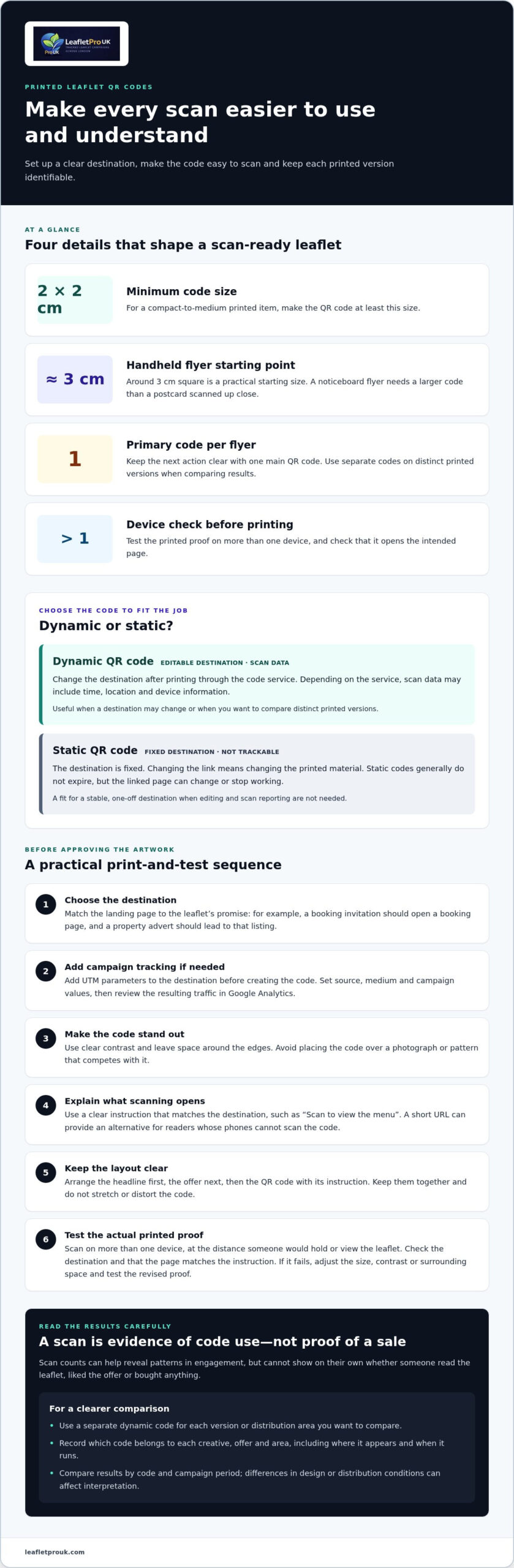
Yes, if you use a dynamic QR code. Change its destination through the code service, and the printed code can direct people to the revised page. A static code has a fixed destination, so changing the link means changing the printed material.
To track leaflet visits in Google Analytics, add UTM parameters to the destination link before creating the code. Set values for source, medium and campaign, such as leaflet, print and a campaign name. Then review the resulting traffic in Google Analytics.
- Choose a dynamic code when the destination may change. A café could first send a flyer scan to a new menu, then redirect it to a seasonal offer without reprinting the flyer. Update the destination in the dynamic QR code service, then scan the printed code to confirm it opens the revised page. The printed pattern stays the same; the destination changes behind it.
- Use a static code for a stable, one-off destination. For example, a leaflet promoting a permanent business address may not need later edits or scan reporting. Static QR codes generally don’t expire, but the link or page behind one can change or stop working. They can’t be edited or tracked, so they suit campaigns where those limitations are acceptable.
- Give each printed version its own dynamic QR code when you need to compare results. A retailer could use separate codes for leaflets distributed in different locations or featuring different offers. Record which code belongs to each version, where it appears and when it runs. This keeps scan results tied to the correct print version instead of blending separate activities.
- Set a clear destination before generating the code. Match the landing page to the leaflet’s call to action: a booking invitation should open a booking page, while a property advert should lead to that listing. For a dynamic code, confirm that its redirect reaches the intended page. Make sure the page still makes sense if you later change the destination.
- Use dynamic scan analytics to review activity and make informed adjustments. Depending on the service, scan data can include time, location and device information, and it can be analysed in real time. Compare results by code and campaign period, then change a destination if the offer has ended. Treat scans as evidence of code use, not proof that someone read or acted on the leaflet.
Making QR codes easy to scan on printed leaflets
A campaign using QR codes on leaflets for tracking needs a code that scans reliably and leads to the intended page. Choose a dynamic QR code generator, add the campaign destination and download the code in a print-ready format. Test the printed proof on more than one device before approving the artwork. The UK Government also recommends testing a QR code on more than one device before printing.
- Set the code size for the way people will handle the leaflet. A compact-to-medium printed item should have a QR code at least 2 by 2 cm. For a handheld flyer, around 3 cm square is a practical starting point. A noticeboard flyer needs a larger code than a postcard scanned up close, because scanning distance affects readability.
- Keep the code distinct from nearby design elements. Use clear contrast between the code and its background, and leave space around its edges. A frame, an eye-catching colour scheme and a short message beneath the code can make it easier to notice. Avoid placing it over a photograph or pattern that competes with its squares.
- Make the call to action explain what happens after scanning. “Scan to view the menu” gives a café customer a clearer reason to connect than “Scan here”. Match the destination to that promise, such as a menu, listing or sign-up page. Include a short URL as an alternative for readers whose phones can’t scan the printed code.
- Prepare the artwork with the tracking destination in place before exporting it. Choose the campaign page, add the QR code, then keep the code and its call to action together in the layout. Arrange the flyer’s content clearly: headline first, offer next, then the QR code and its instruction. Export the final file in the format required for printing, without stretching or distorting the code.
- Compare print placements using distinct codes for each leaflet version. For example, use separate dynamic QR codes for two layouts, then record each version’s location and timing. QR codes on leaflets for tracking are most useful when each code is linked to a clearly recorded version and placement. Scan data can help compare activity, but results are harder to interpret when design and distribution conditions differ.
- Test the actual printed proof, not only the code on a screen. Scan it with more than one device, check that it opens the intended destination and confirm that the page matches the call to action. Test at the distance someone would hold or view the leaflet. If the code fails, adjust its size, contrast or surrounding space, then test the revised proof before printing the full run. For support preparing clear leaflet artwork, explore print-ready leaflet design.
How many QR codes should I put on one flyer?
Use one primary QR code on a flyer to keep the next action clear. Add separate codes to distinct printed versions only when you need to compare their results.
-
Assign codes to flyer versions and areas
Create a separate dynamic QR code for each flyer version or distribution area you want to compare. For example, a campaign could use one code for a discount flyer and another for a product-focused design. Keep a record matching each code to its creative, offer and area. Don’t change several elements between versions without recording them, or scan differences may be difficult to interpret.
-
Track scans by distribution location
Give each distribution location its own code when location-level comparisons matter. A community group distributing flyers at a library, local gym and cafés could use separate codes that lead to the same sign-up page. Compare scans by location after the first week to see where sign-ups are coming from. Record distribution timing too, since different start dates can affect results.
- Choose the campaign outcome before setting up tracking. A scan count shows that someone scanned a code, but it doesn’t prove they read the flyer or completed an action. Connect the code to a relevant landing page, such as a booking form, product page or campaign sign-up. Review the actions taken on the page alongside scan totals to understand more than scan volume alone.
- Use a promotion code or coupon to make a flyer offer measurable. For example, a retailer can link its code to a mobile landing page showing a campaign discount. Keep the offer and destination consistent across the flyer and page, then compare scans with coupon use or completed sign-ups. A QR code can support this measurement, but a scan alone isn’t evidence of a redemption or sale.
- Keep the flyer template focused on one prominent code and one clear call to action. Place the code beside an instruction that explains its benefit, such as “Scan to book” or “Scan to claim the offer”. If the flyer promotes several products, direct its main code to a landing page where readers can choose. This gives the campaign one clear route into the mobile experience, rather than competing codes and instructions.
Scan data including scan counts, operating systems and user locations
Dynamic QR code analytics can show scan counts and may include time, location and device data. Use these signals to compare campaign activity, not to assume every scan represents an interested customer.
-
Review scan counts, timing and locations
Open the campaign dashboard and compare scans by code, time and recorded location. For example, a local event organiser can look for increases after flyers appear near the venue. Some dashboards also show device information, such as an operating system breakdown. Check which fields the platform provides, and treat location as an indication rather than proof of where a leaflet was picked up.
-
Check analytics features and reporting limits
Choose a tracking platform based on the information you’ll use: scan totals, timestamps, location and device details. Check whether reports can be viewed by code or campaign, and whether results can be exported for analysis. A dashboard may present aggregated scan data, but that still describes scans, not individual readers’ interests or actions.
- Set a review routine that suits the campaign. A community fundraiser could compare location-level scans after the first week, then identify which flyer placements are generating sign-ups. Record when each version was distributed, because different start times can affect the pattern. Compare like with like, rather than treating a higher scan count as proof that one design performed better.
- Use scan timing to spot changes in activity. A steady decline in scans from a poster can signal that its placement needs attention. For a short-term retail offer, a rise after distribution may show when people are engaging with the code. Relate these patterns to the campaign schedule and destination, and avoid drawing conclusions from a single scan total.
- Choose analytics tools based on fit, not the longest feature list. The useful option is one that reports the fields you need and lets you distinguish each campaign code. Check how it presents operating-system or other device data, location detail and reporting periods before relying on those measures. No single tool is best for every leaflet campaign.
- Compare platform pricing by the features and access included, such as dynamic destination editing, scan analytics and reporting. UK platforms may offer free access or subscriptions, so check which model covers the functions your campaign needs. Costs depend on the platform’s plan and features; don’t assume free code generation includes dynamic tracking or detailed analytics.
- Keep the limits of scan data in view when evaluating results. A scan doesn’t establish whether someone read the leaflet, liked its offer or made a purchase. Pair scan totals with a campaign outcome, such as completed sign-ups or coupon use, to measure activity beyond the code itself.
Applying leaflet tracking across retail, food, property and events
Choose a destination that suits the audience and next action for each campaign. Retail, food, property and events can all use leaflet scans, but the useful measures differ by sector.
- For retail marketing, direct people from a product leaflet to a relevant product or offer landing page. Give separate printed versions distinct codes when comparing shop locations or promotions. Review scan activity alongside offer redemptions or enquiries, rather than treating scans as sales. A scan tells you the code was used; it doesn’t show whether the reader bought the product.
- For food businesses, connect a takeaway flyer to a menu, booking page or sign-up form. A code beside a specific meal offer should lead directly to that offer, not a general homepage. Compare scans from separate distribution areas, then review orders or bookings through the relevant destination. This separates interest in the printed offer from the actions people take afterwards.
- For property marketing, link a property leaflet to the listing readers expect to see. If promoting different homes or developments, use distinct codes so scans lead to the matching details. Compare scan activity by leaflet version or distribution area, then assess enquiries separately. A scan can indicate that someone accessed the listing, but it can’t establish whether they arranged a viewing.
- For events, choose a landing page that makes the next step clear, such as event details or registration. A local organiser could use different codes for flyers placed in separate locations, then compare scan activity. Keep each code connected to its placement and distribution timing. Review registrations alongside scan data to see whether visitors went beyond viewing the event information.
- Set a measurement plan before distributing flyers in any sector. Record the offer, destination, version and placement for each code, then review scans against the action that matters: an order, booking, enquiry or registration. Keep timing consistent when comparing versions, since different start dates can affect activity. Use scan data to identify patterns, not to claim print alone caused a result.
LeafletPro UK: GPS Tracked Leaflet Distribution
LeafletPro UK helps businesses plan local print campaigns through GPS Tracked Leaflet Distribution and Postcode-Targeted Flyer Distribution. This is a practical next step when you’ve chosen a QR destination and want leaflets delivered to relevant London postcodes.
Keep the measures distinct: QR analytics record scans, while GPS tracking relates to leaflet distribution. Used together in campaign evaluation, they provide different evidence to review, without treating scans as proof of delivery or sales. Leaflet Design Support and High-Quality Printing are also available as part of an optional all-in-one service to prepare printed material around your offer and call to action.
To discuss a local leaflet campaign, visit LeafletPro UK.
Turn scan reporting into a stronger next campaign
Before planning your next print campaign, decide what evidence would help you make a better decision. You might compare responses by area, test a different offer or identify which destination best supports enquiries. Using QR codes on leaflets for tracking gives you scan activity to consider alongside those outcomes, not as a substitute for them.
LeafletPro UK’s GPS Tracked Leaflet Distribution, Postcode-Targeted Flyer Distribution and Leaflet Design Support can help bring campaign delivery and creative planning together. A clear brief, defined audience and practical measurement plan give your next campaign a more considered starting point.
Take the next step with a campaign built around a clear purpose, and use what you learn to make future decisions more informed.
Frequently Asked Questions
What Is a QR Code?
A QR code is a two-dimensional barcode that can store more information than a traditional barcode. A smartphone camera reads its pattern and can offer a link to open. On a leaflet, that link might lead to a menu, product page or event details. The code itself doesn’t explain the offer, so pair it with clear wording that tells readers what they’ll find after scanning.
Can I compare two leaflet designs to see which one gets scanned more?
Yes. Use a different trackable code for each design, then record where and when each version is distributed. For a fairer comparison, keep the offer and audience similar while changing the design element you want to test, such as the headline or image. If one version appears in a different area or runs at a different time, note that too, as those factors can influence scan totals.
How do I know whether my flyer generated a sale?
Connect flyer scans to a sale signal, such as a unique promotion code entered at checkout or an order form asking how the customer heard about you. Then compare recorded purchases with campaign activity. A scan alone can’t show that someone bought something, and a customer may purchase later through another route. Treat the code as one part of your attribution process, not conclusive proof that the flyer caused each sale.
What makes a flyer trackable?
A flyer is trackable when it carries a distinct code or link that lets you identify activity from that printed material. For example, a local venue could use one code for its opening-night flyer and another for a later event promotion. Keeping those destinations and campaign records separate makes the source easier to recognise. To assess responses beyond scans, connect the landing page to an enquiry, booking or redemption measure.
Where should I place a QR code on a brochure?
Place the code beside the information or offer it relates to, so readers can connect the instruction with the destination. A booking code belongs near the booking details, while a product code should sit alongside that product’s description. Avoid hiding it in a busy image or placing it where a fold, binding or overlapping panel could interfere. Include a short instruction that explains the next step.
How do QR codes on leaflets track scans and responses?
A trackable code can direct a smartphone to a web page while a dynamic-code service records scan activity. The reader then sees the destination, such as an event registration page. To measure a response, the page needs a defined action, such as submitting an enquiry or completing a booking. Compare those actions with scan activity, but don’t assume each conversion came from a scan without further attribution evidence.
What data can QR code tracking collect?
Depending on the dynamic-code service, reporting may include scan totals, scan times, location estimates and device information such as operating system. The dashboard describes activity associated with the code, not a complete profile of the person holding the phone. For example, a location report may help compare campaign areas, but it doesn’t establish someone’s identity, whether they read the leaflet or what they thought of its offer.
What are the UK GDPR and PECR rules for tracking QR code scans?
Assess what information your setup collects and what happens after someone scans. Review whether the code service or landing page records device or location details, how that information is used, and what privacy information readers see. Keep collection proportionate to the campaign and review the analytics provider’s handling practices. UK GDPR and PECR considerations depend on the specific data and technologies involved, so get advice on your actual setup before launch.